
 System Admins can simplify the administration of complex Adagio sites with Adagio Console. Console helps you manage a large user community, streamline complex day-end processes, and juggle remote office locations.
One of the key features of Adagio Console is its ability to manage users and user permissions (See video here). You can easily add and remove users, assign roles and permissions, and control access to different areas of the software. This allows you to ensure that only authorized users have access to sensitive financial data, and that users only have access to the areas of the software that they need to do their job. The user management feature also allows you to keep track of who is using the software and when, making it easy to identify and address any potential security breaches.
Adagio Console also provides a range of tools for managing Adagio Accounting’s general settings. This includes configuring the software’s appearance, setting up email notifications, and managing backups. You can customize Adagio Accounting to meet the needs of your business, and to ensure that Adagio Accounting is running smoothly and securely. The ability to manage backups is especially important as it ensures that the business’s financial data is always safe and can be easily restored in case of an emergency.
In addition, Console provides a range of reporting and analysis tools that allow you to view and analyze financial data. This includes the ability to generate reports, view charts and graphs, and export data to Excel. These tools make it easy for you to stay on top of financial operations and make informed, data-driven decisions. The ability to generate reports also allows you to share financial information with other stakeholders in the business, such as management or investors.
Adagio Console also lets you manage Adagio Accounting’s security features. You can set up password policies to ensure that only authorized users have access to the software and that their passwords are secure. The monitoring user activity feature allows you to keep track of who is accessing the software and when, making it easy to identify and address any potential security breaches. The security alerts feature sends notifications to you in case of any suspicious activity, so you can take quick action to prevent any potential breaches.
Console also provides a centralized location for managing system settings, including managing the software’s license, monitoring system resources and managing system updates. It allows you to easily keep track of the license status, system resources usage, and updates for the software. This feature ensures that the software is up-to-date, and that it is not exceeding the allocated resources, which can cause performance issues.
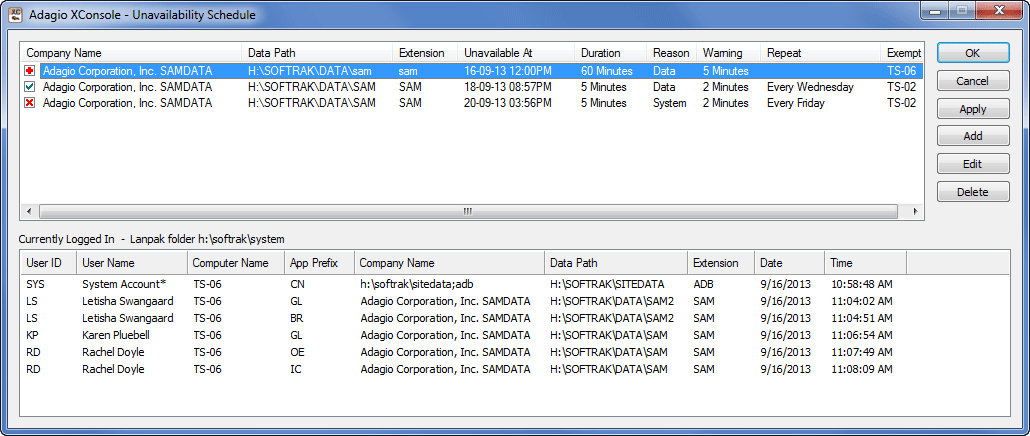
Do you need to schedule a system shutdown? To perform regular system or company maintenance, exclusive data access is generally required. Use Adagio Console to schedule system shutdowns to gain this access. Also use the internal outgoing messaging system to push information to Adagio users, and even close those programs from remotely connected workstations. (See video here)
Overall, Console provides a comprehensive and user-friendly interface that gives you full control, making it easy to manage and maintain Adagio and your business’s financial operations.
If you haven’t installed Console yet, give us a call or send us an email and we will look at what it can do for your Adagio installation.
This is an excerpt from The Score, one of our publications you can have delivered to your inbox monthly!
Photo by Johan Godínez on Unsplash